
Calculating percentage is something every student needs to do, whether in school, college, or university. Many students ask the same question: “How to calculate percentage in calculator?”. The good news is, it is very simple. In this blog, we will explain everything in easy steps, with examples and formulas, so that you can understand and calculate percentage without any confusion.
📌 What is Percentage?
A percentage is a way to express numbers as a fraction of 100. The word “percent” means “per hundred.” For example:
- 50% means 50 out of 100
- 80% means 80 out of 100
- 25% means 25 out of 100
In exams, we often say: “I got 75% marks.” This means the student got 75 marks out of 100, or the same ratio when marks are out of a different total.
📌 Why Do We Need Percentage?
Percentage is very useful in daily life:
- Students use it to check their exam results.
- Teachers use it to prepare report cards.
- Shops use percentage for discounts (e.g., 20% off).
- Banks use it for interest rates.
That’s why learning how to calculate percentage in calculator is very important.
📌 Formula for Percentage
Before using a calculator, let’s understand the formula:
Percentage = (Obtained Marks ÷ Total Marks) × 100
Example: If a student got 420 marks out of 550, then:
(420 ÷ 550) × 100 = 76.36%
This is the percentage score.
📌 How to Calculate Percentage in Calculator (Step by Step)
There are two ways: using a normal calculator and using an online percentage calculator of marks.
🔹 Method 1: Using a Normal Calculator
If you have a simple calculator, follow these steps:
- Enter your Obtained Marks.
- Press the division (÷) sign.
- Enter your Total Marks.
- Press the equals (=) button.
- Multiply the answer by 100.
Example:
- Marks = 360, Total = 500
- 360 ÷ 500 = 0.72
- 0.72 × 100 = 72%
That’s it! This is how to calculate percentage manually using a calculator.
🔹 Method 2: Using an Online Percentage Calculator
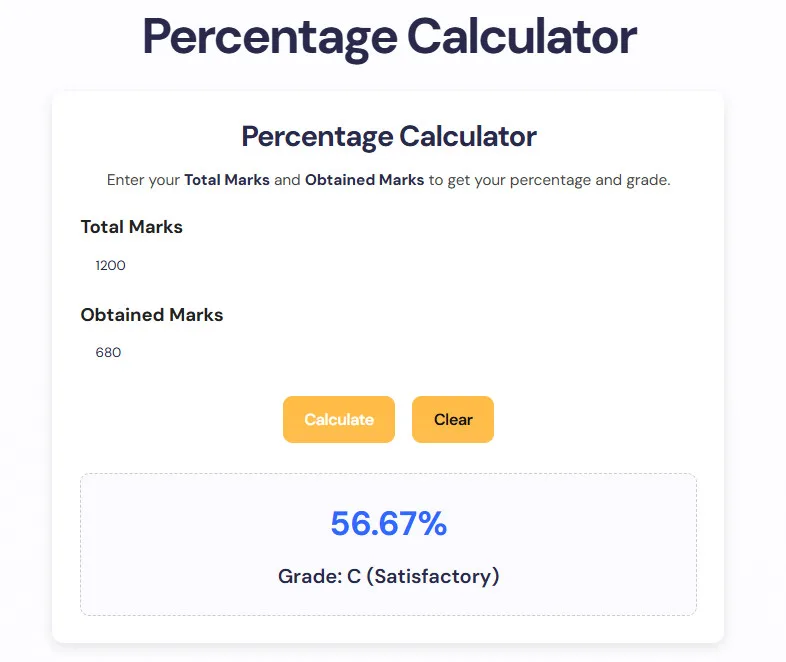
The second and easier way is to use an online percentage calculator of marks.
Steps:
- Open the calculator page.
- Enter Total Marks (e.g., 600).
- Enter Obtained Marks (e.g., 490).
- Click Calculate.
- The result will show the Percentage and the Grade.
This is much faster and avoids mistakes.
📌 Example Questions (Practice)
Example 1 Total Marks = 100, Obtained Marks = 75 (75 ÷ 100) × 100 = 75%
Example 2 Total Marks = 800, Obtained Marks = 640 (640 ÷ 800) × 100 = 80%
Example 3 Total Marks = 550, Obtained Marks = 385 (385 ÷ 550) × 100 = 70%
📌 Percentage to Grade Scale
Most schools also use a grade system along with percentage. Here is the common scale:
- A+ (Excellent): 80% – 100%
- A (Very Good): 70% – 79%
- B (Good): 60% – 69%
- C (Satisfactory): 50% – 59%
- D (Pass): 40% – 49%
- Fail: Below 40%
So, if your percentage calculator of marks shows 85%, your grade is A+.
📌 Advantages of Online Marks Percentage Calculator
- ✅ Saves time
- ✅ Gives instant results
- ✅ Always accurate
- ✅ Works on mobile and computer
- ✅ Shows both percentage and grade
This is why many students now prefer online calculators over manual methods.
📌 FAQs – How to Percentage in Calculator
Q1. How to calculate percentage in calculator? Enter obtained marks ÷ total marks, then multiply by 100.
Q2. What is the formula of percentage? (Obtained Marks ÷ Total Marks) × 100.
Q3. Can I use a simple calculator for percentage? Yes, but you need to divide and then multiply by 100.
Q4. What is the easiest way to find percentage? Use an online Marks Percentage Calculator – just enter marks and click calculate.
Q5. Can teachers also use this tool? Yes ✅ Teachers can use the percentage calculator of marks to quickly check results for the whole class.
📌 Conclusion
Now you know how to calculate percentage in calculator. You can do it in two ways:
- By using a normal calculator → divide obtained marks by total marks, then multiply by 100.
- By using an online Marks Percentage Calculator → enter your marks and get instant results.
The second method is easier, faster, and always correct. Whether you are a student or a teacher, this tool will save time and give you the right percentage with grade.
This free guide is brought to you by Moosa Learning Hub – your trusted source for student learning tools and calculators.